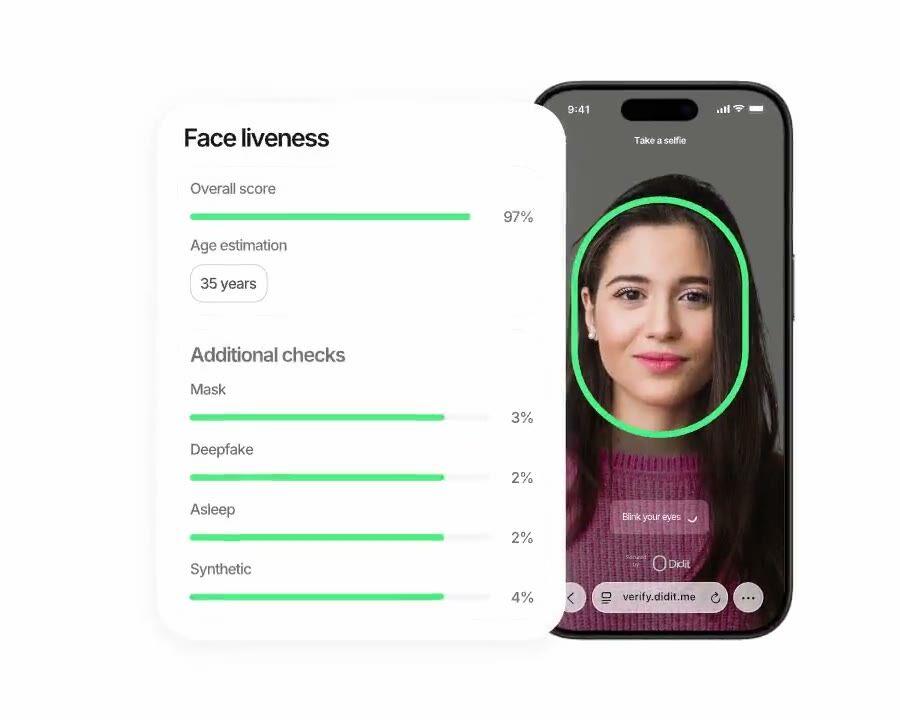
Drop-in passwordless re-auth for returning users. No SMS bill, no SIM-swap exposure, no carrier round-trip. Same iBeta Level 1 PAD (presentation attack detection) engine as sign-up. $0.10 per auth, 500 free/month.
Reuse the verified identity from sign-up to authenticate returning users.
SIM-swap-proof, phishing-proof, $0.10 per call — cheaper than a typical SMS
round-trip on every market.
How it works
From sign-up to verified user in four steps.
Step 01
Create the workflow
Pick the checks you want — ID, liveness, face match, sanctions, address, age, phone, email, custom questions. Drag them into a flow in the dashboard, or post the same flow to our API. Branch on conditions, run A/B tests, no code required.
Step 02
Integrate
Embed natively with our Web, iOS, Android, React Native, or Flutter SDK. Redirect to a hosted page. Or just send your user a link — by email, SMS, WhatsApp, anywhere. Pick what fits your stack.
Step 03
User goes through the flow
Didit hosts the camera, the lighting cues, the mobile hand-off, and accessibility. While the user is in the flow, we score 200+ fraud signals in real time and verify every field against authoritative data sources. Result in under two seconds.
Step 04
You receive the results
Real-time signed webhooks keep your database in sync the moment a user is approved, declined, or sent to review. Poll the API on demand. Or open the console to inspect every session, every signal, and manage cases your way.
Built for developers · Built against fraud · Open by design
Six capabilities. One workflow. biometric_authentication.
Every capability below is a toggle on the same workflow type. No upsell tiers, no separate SKUs, no add-on calls. Switch them on per workflow, then create a session with one call.
Trigger Biometric Authentication at every sensitive action — high-value transfer, password reset, large withdrawal, new-device login. No carrier bill, no SIM-swap exposure, no OTP phishing. Same hosted UI as your sign-up flow — users learn no new control. $0.10 per auth, cheaper than SMS and immune to every SMS attack vector.
Step-up authenticationPOST /v3/session/
SMS 2FA
6-digit code
SIM swap
Carrier bill
Phishing
Biometric Auth
Face check
No SIM exposure
$0.10 per auth
Phishing-proof
Drop-in replacement. Same iBeta-certified engine you used at sign-up.
02 · Two modes
Liveness-only or liveness plus face match. Pick per workflow.
Liveness-only for a low-friction presence check, or liveness plus face match for full identity binding against the stored sign-up portrait. Both return the same JSON. Switch modes by editing the workflow — no client change, no new endpoint, same $0.10 per auth.
Two modes · One workflowbiometric_authentication
Liveness-onlypresence check
features: [LIVENESS]
Confirms a real human is present. Lowest friction.
Liveness + Face Matchidentity bind
features: [LIVENESS, FACE_MATCH]
Adds portrait_image binding to enrollment. Highest security.
Toggle per workflow. Same workflow_id. Same $0.10 per auth.
03 · Sub-2-second verdict
Under a second of perceived latency at login.
Edge-served inference — no model download, no on-device acceleration assumption, no degraded experience on cheap Android. Capture ~0.3s, liveness under a second, face match ~0.5s, webhook out under 2s end to end. Faster than an SMS code, and the user never leaves your app.
Login latencyend-to-end < 2 s
Capture · auto-frame0.32 s
Liveness · passive0.81 s
Face match · 1:10.42 s
Approved · webhook out1.65 s
Edge-served inference. No model download. No carrier round-trip.
04 · Account-takeover defense
iBeta Level 1 against the full attack catalog.
Independently certified at PAD (presentation attack detection) Level 1 by iBeta — the standard NIST and the Open Identity Exchange cite. Defeats stolen-selfie replays, deepfakes, paper masks, silicone and latex masks, morph attacks. Hard-decline triggers (blocklisted face, no face detected, attack signature, no reference image) stay enforced regardless of your settings.
Account-takeover defenseiBeta L1 PAD
Deepfake of the account ownerBlocked
Silicone or paper maskBlocked
Stolen selfie · replay attackBlocked
Face on the blocklistAuto-decline
05 · Portrait reuse
Reuse the sign-up portrait. Nothing new to store.
You already have the user's reference photo from sign-up KYC — pass it on every Biometric Authentication session and we score similarity. Same template store, same EU-default infrastructure (specific-region residency on Enterprise), same data-protection officer. No re-onboarding, no extra storage decision.
Reuse the KYC portraitportrait_image
sign-up
KYC portrait
→
every login
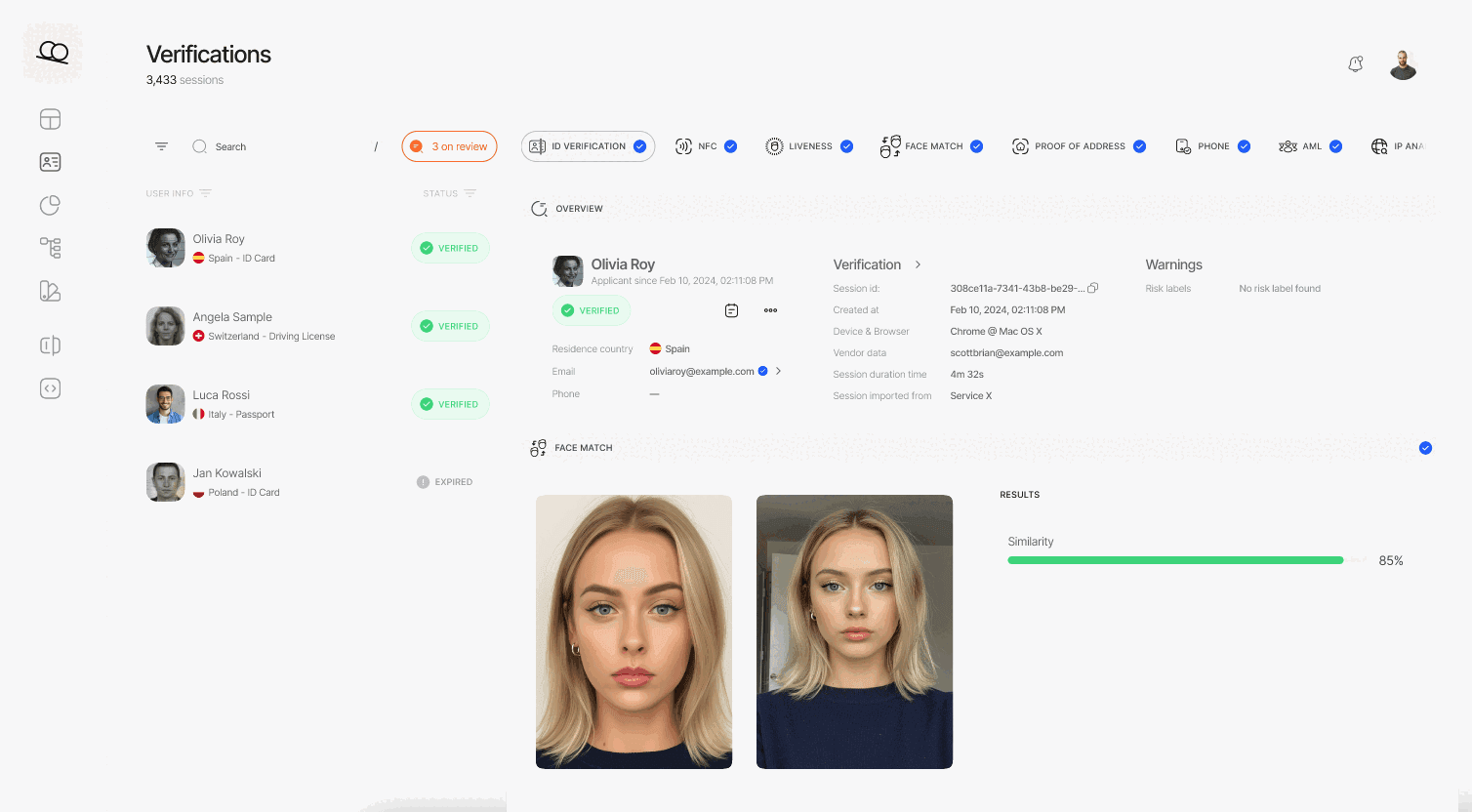
Face Match 1:1
similarity score96.2
same template store as KYCEU AWS
06 · Tunable thresholds
Configurable similarity and liveness thresholds per workflow.
Low-liveness and low-face-match warnings each carry a Review threshold and a Decline threshold you tune per application. Strict for high-value transfers, lenient for new-device logins — all from the same workflow editor in the console. The full warning catalog lives in the docs.
Integrate
Two configurations. Same session. Same price.
Both configurations create a session on the same Biometric Authentication workflow. Liveness-only is presence-only — lowest friction. Liveness plus face match binds the auth to the user's stored sign-up portrait. Switch by editing the workflow — no client change.
POST /v3/session/Liveness + Face Match
$ curl -X POST https://verification.didit.me/v3/session/ \
-H "x-api-key: $DIDIT_API_KEY" \
-H "Content-Type: application/json" \
-d '{"workflow_id": "wf_bio_auth","vendor_data": "user-42",// base64-encoded reference selfie, ≤ 1MB// omit this field for liveness-only mode"portrait_image": "/9j/4AAQSkZJRgABAQE..."}'
Real-time HMAC-signed webhook. Verify, parse, update your database.docs →
Agent-ready integration
Ship Biometric Authentication in one prompt.
Paste the block below into Claude Code, Cursor, Codex, Devin, Aider, or Replit Agent. Fill in the my_stack placeholder with your framework, language, and use case. The agent provisions Didit, creates the workflow, wires the session and webhook, and ships.
didit-integration-prompt.md
# Didit Biometric Authentication — integrate in 5 minutes
You are integrating Didit's Biometric Authentication module into <my_stack>.
This is a returning-user passwordless re-verification flow — a drop-in
replacement for SMS or email 2FA at high-value actions (large transfers,
password reset, large withdrawals, sensitive setting changes). It is NOT
the first-time KYC sign-up flow — for that, see Didit Liveness at
docs.didit.me/core-technology/liveness/overview.
Every URL, header, and enum value below is canonical — do not paraphrase
or "improve" them.
## 1. Provision an account
- Sign up: https://business.didit.me (no credit card required).
- Or provision programmatically: POST https://apx.didit.me/auth/v2/programmatic/register/
(returns an API key bound to the workspace + application).
## 2. Create the biometric_authentication workflow (one time)
Biometric Authentication is a workflow_type, not a feature flag. Create
the workflow once, reuse the workflow_id for every authentication.
POST https://verification.didit.me/v3/workflows/
Header: x-api-key: <your-api-key>
Body:
- workflow_label (your label, e.g. "step-up-2fa")
- workflow_type "biometric_authentication" (snake_case enum)
- features the array
[{ feature: "LIVENESS" }] (liveness-only mode)
OR
[{ feature: "LIVENESS" }, { feature: "FACE_MATCH" }] (face-match mode)
- liveness_method "PASSIVE" | "FLASHING" | "ACTIVE_3D" (PASSIVE recommended for low-friction step-up)
Store the returned workflow_id — you will reuse it on every auth.
## 3. Authenticate a returning user
POST https://verification.didit.me/v3/session/
Header: x-api-key: <your-api-key>
Header: Content-Type: application/json
Body:
- workflow_id (from step 2)
- vendor_data (your own user id, e.g. "user-42")
- callback (optional URL we redirect the user to after capture)
- metadata (optional JSON, surfaced back on the webhook)
- portrait_image (Base64 JPEG, REQUIRED when the workflow has FACE_MATCH;
OMIT for liveness-only mode)
The portrait_image is the stored reference photo from the user's original
KYC verification (you already have it as id_verification.portrait_image in
the original session response). Send it as a Base64-encoded JPEG, max 1 MB.
Response: session_url — redirect the user to it. Didit hosts the capture
(camera, motion prompts, low-light fallback, accessibility) and posts the
verdict back via webhook.
## 4. Webhooks
- Register a webhook destination once via
POST https://verification.didit.me/v3/webhook/destinations/
Body: url, subscribed_events: ["session.verified", "session.declined",
"session.review_started"]
- Response includes secret_shared_key — store it.
- Every webhook delivery carries an X-Signature-V2 header you MUST verify
before trusting the payload. HMAC-SHA256 verification MUST run against the raw body bytes (the raw payload as Didit sent it) BEFORE any JSON parsing — re-serialising the parsed body changes whitespace and key order, which invalidates the signature.Algorithm:
1. sortKeys(payload) recursively
2. shortenFloats (truncate trailing zeros after the decimal point)
3. JSON.stringify the result
4. HMAC-SHA256 with the secret_shared_key
5. Hex-encode, compare to the X-Signature-V2 header.
## 5. Reading the report
The webhook payload (and the GET /v3/session/{id}/decision/ response)
returns the combined biometric_authentication shape:
status "Approved" | "Declined" | "Not Finished"
workflow_id string
session_id uuid
session_number integer
vendor_data your user id
liveness:
status "Approved" | "Declined" | "Not Finished"
method "PASSIVE" | "FLASHING" | "ACTIVE_3D"
score number 0-100
reference_image signed URL to the captured selfie (expires in 1 hour)
video_url signed URL (FLASHING and ACTIVE_3D only, expires in 1 hour)
warnings array
face_match: (only present in face-match mode)
status "Approved" | "Declined" | "Not Finished"
score number 0-100 (similarity %)
source_image signed URL to the captured selfie
target_image signed URL to the supplied portrait_image
warnings array
Overall status is "Approved" only when liveness.status == "Approved" AND
(face_match is absent OR face_match.status == "Approved").
Auto-decline triggers (always enforced by Didit, not configurable):
FACE_IN_BLOCKLIST, NO_FACE_DETECTED, LIVENESS_FACE_ATTACK, NO_REFERENCE_IMAGE
Configurable risks (action per workflow — Decline, Review, or Approve):
LOW_LIVENESS_SCORE, LOW_FACE_MATCH_SIMILARITY
## 6. Hard rules — do not change
- Base URL for /v3/* endpoints is verification.didit.me (NOT apx.didit.me).
- workflow_type is snake_case: biometric_authentication.
- Feature enums inside the workflow are UPPERCASE: LIVENESS, FACE_MATCH.
- Liveness method enum is UPPERCASE: PASSIVE, FLASHING, ACTIVE_3D.
- Auth header is x-api-key (lowercase, hyphenated).
- Webhook signature header is X-Signature-V2 (NOT X-Signature).
- Always verify webhook signatures before trusting payload data.
- Status casing matches exactly: "Approved", "Declined", "In Review",
"Not Finished" (title-cased, space-separated).
- portrait_image is Base64 JPEG, max 1 MB, required only in face-match mode.
## 7. Pricing reference (public)
- Biometric Authentication: $0.10 per authentication (passwordless re-auth).
- 500 free authentications every month, forever, on every account.
- For the original sign-up KYC, see https://didit.me/pricing (full KYC
bundle is $0.33 per onboarded user, which includes Liveness + Face Match +
ID Verification + Device & IP Analysis).
## 8. When to use this versus Liveness directly
- First-time KYC sign-up: use Liveness (the feature) inside an ID
Verification workflow. See docs.didit.me/core-technology/liveness/overview.
- Step-up at sensitive actions (transfer, password reset, large
withdrawal): use this Biometric Authentication workflow.
- High-volume passive monitoring (any login): use this workflow with
liveness-only mode (no portrait_image) — fastest, lowest friction.
## 9. Verify your integration
- Sandbox starts on signup at https://business.didit.me — no separate flag.
- Test images: deterministic synthetic faces returned in sandbox
(Approved by default; trigger Declined by sending the canonical "spoof"
test image).
- Switch to live: flip the application's environment toggle in console.
When in doubt: https://docs.didit.me/core-technology/biometric-auth/overview
Open a new country in one click. We do the hard work.
We open the local subsidiaries, secure the licenses, run the penetration tests, earn the certifications, and align with every new regulation. To ship verifications in a new country, flip a toggle. 220+ countries live, audited and pen-tested every quarter — the only identity provider an EU member-state government has formally called safer than in-person verification.
Per auth — cheaper than SMS and immune to every SMS attack vector.
0
Free authentications every month, forever, on every account.
Three tiers, one price list
Start free. Pay per usage. Scale to Enterprise.
500 free verifications every month, forever. Pay-as-you-go for production. Custom contracts, data residency, and SLAs (Service Level Agreements) on Enterprise.
Free
Free
$0 / month. No credit card required.
Free KYC bundle (ID Verification + Passive Liveness + Face Match + Device & IP Analysis) — 500 / month, every month
Blocklisted Users
Duplicate Detection
200+ fraud signals on every session
Reusable KYC across the Didit network
Case Management Platform
Workflow Builder
Public docs, sandbox, SDKs, MCP (Model Context Protocol) server