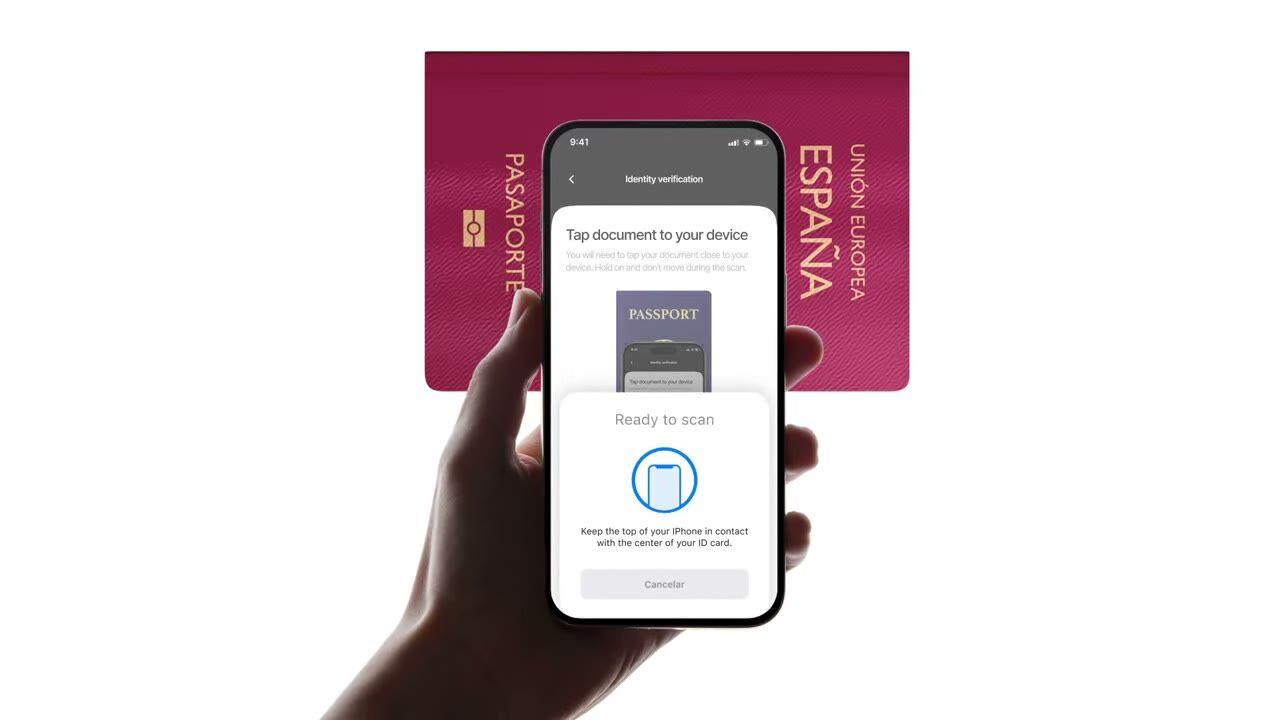
Tap an e-passport or e-ID to the phone. Reads the chip, validates the government signature, catches forgeries plain photo checks miss. $0.15 per read, 500 free/month.
Tap the passport. The chip returns the same data the photo did, except this
time it's signed by the issuing country. $0.15, sub-2-second.
How it works
From sign-up to verified user in four steps.
Step 01 / 04
01
Create the workflow
Pick the checks you want, ID, liveness, face match, sanctions, address, age, phone, email, custom questions. Drag them into a flow in the dashboard, or post the same flow to our API. Branch on conditions, run A/B tests, no code required.
Integrate
Embed natively with our Web, iOS, Android, React Native, or Flutter SDK. Redirect to a hosted page. Or just send your user a link, by email, SMS, WhatsApp, anywhere. Pick what fits your stack.
User goes through the flow
Didit hosts the camera, the lighting cues, the mobile hand-off, and accessibility. While the user is in the flow, we score 200+ fraud signals in real time and verify every field against authoritative data sources. Result in under two seconds.
You receive the results
Real-time signed webhooks keep your database in sync the moment a user is approved, declined, or sent to review. Poll the API on demand. Or open the console to inspect every session, every signal, and manage cases your way.
Built for developers · Built against fraud · Open by design
Six capabilities. One feature flag. NFC.
Every capability below is a toggle on the same module. No upsell tiers, no separate SKUs, no add-on calls. Switch them on per workflow, or include the NFC module when you create a workflow over the API.
Verify the signature on every chip, not the print on the page.
Every modern e-passport and e-ID carries a contact-less chip signed by the issuing government. We read it over NFC (near-field communication), validate the digital signature, and return a tamper-proof verdict. Catches morph attacks, photo substitutions, and forgeries that pass visual inspection.
SPAINe-Passport
P<ESPROY<<OLIVIA<<<<<<<
Chip readICAO 9303
Passive AuthenticationSOD signature valid
Active AuthenticationChip challenge OK
Chip AuthenticationSession key derived
Signed by issuerAuthentic
02 · ICAO 9303 data groups
Full chip contents extracted, structured, and signed.
Every ICAO 9303 data group on the chip is read, signed security object, personal data, MRZ (machine-readable zone), high-resolution facial image, signature image, plus any additional biometrics the issuing country stores. You get a clean `chip_data` JSON plus signed URLs for the portrait and signature.
Document chipSOD · signed data groups
Signed
First nameDG1
Olivia
Last nameDG1
Roy
Date of birthDG1
12 Mar 1992
Document numberDG1
XAB204731
Facial imageDG2
High-res portrait
Signed at issuance · not OCR5 fields verified
03 · ICAO PKD trust
Trust anchored at the ICAO Public Key Directory.
Every chip read traces the full certificate chain, document signer → country signing authority → ICAO Public Key Directory root, and checks the country's revocation list in real time. Revoked and expired certificates surface as configurable warnings; the rest passes through as authenticity booleans on the report.
Document SignerDSC · eID Spain
Country Signing CACSCA · CRL current
ICAO PKD RootPublic Key Directory
Root
Integrity
SOD integrity
DG integrity
DSC not revoked
DSC not expired
Verified · ICAO PKDChain valid
04 · Photo vs chip
Cross-check every field. Auto-decline on mismatch.
Photo data must match chip data. When they diverge, the session auto-declines, that trigger cannot be turned off. It is the cleanest signal of a tampered photo zone, a swapped chip, or a fake document with real-looking print.
Data source
Camera OCRChip read
Document number
XAB2O4731XAB204731≈ 91.4%Signed
First name
0LIVIAOLIVIA≈ 96.7%Signed
Expiry date
03 / 203103 / 2031≈ 99.1%Signed
Best-effort read · fonts, glare, wearExact values · signed by the issuer2 mismatchesSource of truth
05 · Mobile SDK first
iOS, Android, React Native, Flutter, chip read built in.
Native SDKs wire the device NFC reader, entitlements, and chip-reading UI for you. iOS uses Core NFC; Android uses IsoDep on NfcAdapter; React Native and Flutter wrap both. Browsers without NFC fall back to standard ID + selfie automatically, a skip warning fires and the session continues.
React Native · FlutterBridges the native SDKsBridgedidit.nfc.read()One call · native under the hood
Web browserNo NFC · falls back to OCRFallbackdidit.ocr.scan()Camera capture · OCR fields
One call · NFC when the device supports itAuto-fallback · session continues with OCR
06 · Worldwide coverage
Every ICAO-issuing country, growing every quarter.
Most passports issued after 2006 ship a chip, plus a growing list of national e-IDs, Spanish DNIe, German Personalausweis, Italian CIE, Estonian ID-card, Portuguese Cartão de Cidadão, Belgian eID, Dutch eID. Country certificates refresh automatically; new countries become readable the day we ingest them.
DNIeSpain
PersonalausweisGermany
Carta CIEItaly
Cartão de CidadãoPortugal
ID-kaartEstonia
2006e-Passports since
30+National e-IDs
9303ICAO standard
CSCA certificates refreshed automaticallyReadable via NFC
Integrate
One workflow. Two ways to launch the chip read.
NFC has no server-to-server standalone endpoint, the chip needs a device with NFC hardware. Both paths below share the same create-session call; they differ only in whether the user reads the chip in our hosted UI or inside your own app via the native SDK.
// iOS · Swift
import DiditSdk
let result = try await DiditSdk.shared.startVerification(
with: sessionId,
configuration: config)
donein-app{ "status": "Approved" }
Agent-ready integration
Ship NFC Verification in one prompt.
Paste the block below into Claude Code, Cursor, Codex, Devin, Aider, or Replit Agent. Fill in the my_stack placeholder with your framework, language, and use case. The agent provisions Didit, builds the workflow with NFC enabled, wires the webhook, and ships.
didit-integration-prompt.md
# Didit NFC Verification — integrate in 5 minutes

You are integrating Didit's NFC Verification (cryptographic e-passport
and e-ID chip reading) module into <my_stack>. Follow these steps exactly.
Every URL, header, and enum value below is canonical — do not paraphrase
or "improve" them.

## 1. Provision an account
- Sign up: https://business.didit.me (no credit card required).
- Or provision programmatically: POST https://apx.didit.me/auth/v2/programmatic/register/
  (returns an API key bound to the workspace + application).

## 2. What NFC Verification actually does
NFC Verification reads the secure contact-less chip embedded in modern
e-passports and e-IDs (the small chip-and-antenna sticker symbol on the
cover) and runs four cryptographic checks against the data it extracts:

1. Passive Authentication — every Data Group (DG1 personal data, DG2
   facial image, etc.) is hashed and compared against the signed hash
   stored in the Document Security Object (SOD). Catches any single-bit
   tampering of the chip contents.
2. Certificate chain validation — Document Signer Certificate (DSC) →
   Country Signing Certificate Authority (CSCA) → ICAO Public Key
   Directory (PKD) root. Proves the chip was signed by the issuing
   government, not a clone.
3. Certificate Revocation List (CRL) check — DSCs revoked by the issuing
   country are caught and flagged.
4. Chip Authentication — where the document supports it, prevents chip
   cloning by challenging the chip with a key-pair handshake.

PACE (Password Authenticated Connection Establishment) or BAC (Basic
Access Control) is used to derive the session key from the Machine-Readable Zone (MRZ); Didit
handles that automatically. All of this is ICAO 9303 standard.

## 3. Two integration paths — pick one

### Path A — Workflow Builder (hosted UI, REQUIRED for NFC)
NFC Verification has no server-to-server standalone endpoint. The chip
has to be read by a device with NFC hardware, so you always integrate
through the Workflow + native SDK (or hosted mobile web that falls back).

1. Create a workflow that contains the NFC feature:
   POST https://verification.didit.me/v3/workflows/
   Authorization header:  x-api-key: <your-api-key>
   Body: workflow_label, features array with the entries
         { feature: "ID_VERIFICATION" }
         { feature: "NFC" }
         (UPPERCASE — strict enum)
   You should always pair NFC with ID_VERIFICATION so the MRZ is captured
   for the chip handshake AND so an OCR cross-validation is available.

2. Create a verification session for an end user:
   POST https://verification.didit.me/v3/session/
   Body: workflow_id (from step 1), vendor_data (your own user id).
   Response: session_url — redirect the user to it (or open it in the
   native SDK with shared.startVerification(with: sessionId)).

3. Listen for webhook callbacks (see "Webhooks" below).

### Path B — Native SDKs (drop-in, recommended for mobile apps)
Same workflow + session above, but launch the verification flow in your
own iOS or Android app via the Didit SDK. The SDK wires the NFC reader,
the entitlements, and the chip-reading UI for you.

- iOS: DiditSdk.shared.startVerification(with: sessionId, configuration:)
  Required entitlements (handled by the SDK):
    - com.apple.developer.nfc.readersession.formats = ["TAG"]
    - ISO7816 application identifiers for ePassports
- Android: DiditSdk.startVerification(sessionId, config) — uses
  IsoDep (android.nfc.tech.IsoDep) under the hood.
- React Native / Flutter: the same SDK, exposed through the cross-
  platform module — see docs.didit.me/integration/native-sdks/.

### Web browsers — NFC is unavailable
Web NFC API is not generally available. Chrome on Android has an
experimental Web NFC that is unstable and requires explicit permissions;
Safari on iOS has no support. For web integrations, NFC is automatically
skipped and the user proceeds with standard ID + selfie. If you require
NFC, deep-link the user into the Didit App or your own native app.

## 4. Webhooks
- Register a webhook destination once via
  POST https://verification.didit.me/v3/webhook/destinations/
  Body: url, subscribed_events: ["session.verified", "session.review_started",
                                  "session.declined"]
- Response includes secret_shared_key — store it.
- Every webhook delivery carries an X-Signature-V2 header you MUST verify
  before trusting the payload.  HMAC-SHA256 verification MUST run against the raw body bytes (the raw payload as Didit sent it) BEFORE any JSON parsing — re-serialising the parsed body changes whitespace and key order, which invalidates the signature.Algorithm:
    1. sortKeys(payload) recursively
    2. shortenFloats (truncate trailing zeros after the decimal point)
    3. JSON.stringify the result
    4. HMAC-SHA256 with the secret_shared_key
    5. Hex-encode, compare to the X-Signature-V2 header.

## 5. Reading the report
The session report includes an nfc object alongside the id_verification
object. Top-level fields on nfc:

- status: "Approved" | "Declined" | "In Review" | "Not Finished"
- portrait_image: signed URL to the chip-extracted DG2 facial image
- signature_image: signed URL to the chip-extracted DG7 signature
- chip_data:
    document_type, issuing_country (ISO 3166-1 alpha-3),
    document_number, expiration_date (YYYY-MM-DD),
    first_name, last_name, birth_date, gender ("M" | "F" | "U"),
    nationality (ISO 3166-1 alpha-3), address, place_of_birth.
- authenticity:
    sod_integrity (boolean — every Data Group hash matched the SOD)
    dg_integrity (boolean — Data Group binary integrity check passed)
- certificate_summary:
    issuer (CSCA Common Name + serial + organization + country)
    subject (DSC Common Name)
    serial_number
    not_valid_after (YYYY-MM-DD HH:MM:SS)
    not_valid_before (YYYY-MM-DD HH:MM:SS)
- warnings: Array of { risk, additional_data, log_type,
                       short_description, long_description }

### Auto-decline (always enforced, never configurable)
- NFC_AND_OCR_DATA_NOT_SAME — Optical Character Recognition (OCR) data
  and chip data differ. Indicates document tampering or fake chip.

### Configurable warnings (per-workflow action: Decline / Review / Approve)
- SKIPPED_NFC_VALIDATION       — chip not read (no NFC hardware, no
                                  permissions, document has no chip)
- NFC_CHIP_NOT_VERIFIED        — chip read but signature could not be
                                  verified (missing CSCA, older document)
- DSC_CERTIFICATE_REVOKED      — Document Signer Certificate listed on
                                  the issuing country's CRL
- DSC_CERTIFICATE_EXPIRED      — Document Signer Certificate past its
                                  validity period

## 6. Hard rules — do not change
- Base URL for /v3/* endpoints is verification.didit.me (NOT apx.didit.me).
- Feature enum is UPPERCASE: NFC, ID_VERIFICATION, LIVENESS, FACE_MATCH.
- Auth header is x-api-key (lowercase, hyphenated).
- Webhook signature header is X-Signature-V2 (NOT X-Signature).
- Always verify webhook signatures before trusting payload data.
- Always pair NFC with ID_VERIFICATION in the workflow — NFC alone
  cannot derive the chip key without the MRZ from the document photo.
- Status casing matches exactly: "Approved", "Declined", "In Review",
  "Not Finished" (title-cased, space-separated).
- Treat NFC as an additive confidence boost, not a hard gate, unless
  your risk policy explicitly requires it (regulated remote
  onboarding under PSD3, AMLD6 high-risk customer flows, etc.).

## 7. Pricing reference (public)
- NFC Verification: $0.15 per chip read (standalone module).
- Bundled inside a full Know Your Customer (KYC) workflow (ID + Liveness + Face Match + NFC):
  priced as the underlying KYC bundle ($0.33) + $0.15 NFC if enabled.
- 500 free checks every month, forever, on every account.

## 8. Verify your integration
- Sandbox starts on signup at https://business.didit.me — no separate flag.
- Test documents: use the Didit App on a real iOS or Android device with
  any ICAO 9303 e-passport issued after 2006 (most modern passports).
- Sandbox webhook events fire the same shape as production; verify the
  X-Signature-V2 header in dev too.
- Switch to live: flip the application's environment toggle in console.

When in doubt: https://docs.didit.me/core-technology/nfc-verification/overview
Compliant by design
Open a new country in one click. We do the hard work.
We open the local subsidiaries, secure the licenses, run the penetration tests, earn the certifications, and align with every new regulation. To ship verifications in a new country, flip a toggle. 220+ countries live, audited and pen-tested every quarter, the only identity provider an EU member-state government has formally called safer than in-person verification.
Every chip read against the canonical e-passport standard.
PKD
Trust anchored at the ICAO Public Key Directory root.
<0s
End-to-end chip read on a modern smartphone.
$0.00
Per NFC chip read. 500 free every month.
Three tiers, one price list
Start free. Pay as you go. Scale to Enterprise.
500 free verifications every month, forever. Then pay only when a module runs. Custom contracts, data residency, and service level agreements (SLAs) on Enterprise.
Free
$0/ month · no card
For building, testing, and your first users.
Everything you need to start:
500 full KYC verifications every month
ID, liveness, face match, device & IP
200+ fraud signals, blocklist, duplicates
Reusable KYC across the Didit network
Workflow builder, case management, SDKs
AI supportIn-console AI agent, docs, and community.