Didit Raises $2M and Joins Y Combinator (W26)
Didit
White Label

Your brand.
Our infrastructure.

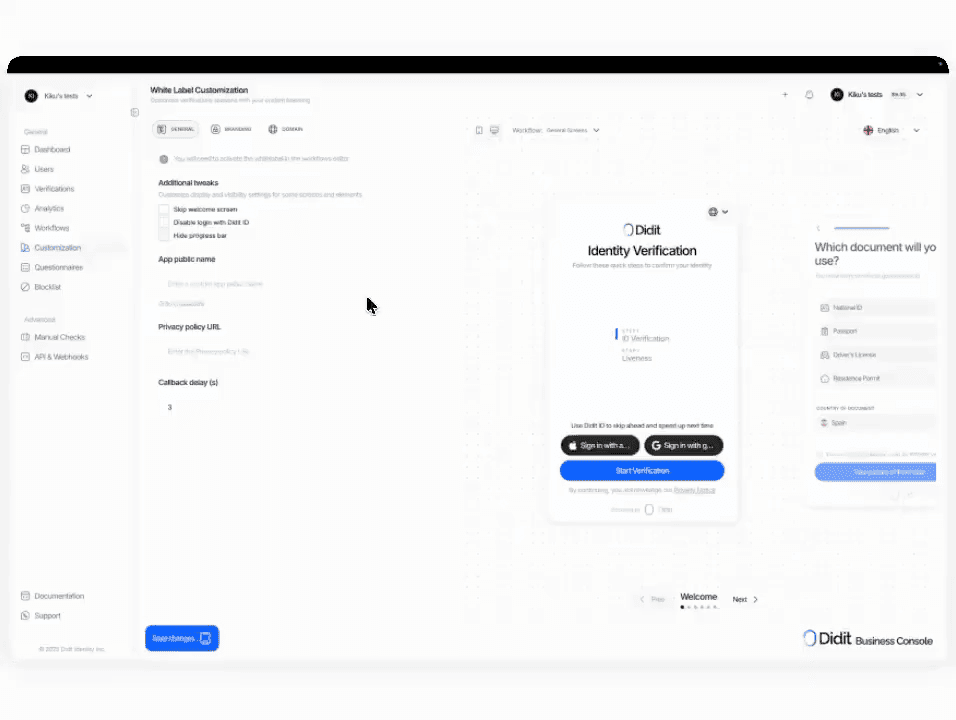
Run the verification flow on your domain, with your logo, your colors, and your sender — no Didit branding anywhere your users look. $0.20 per session on top of the module price.

Backed by
Y Combinator
GBTC Finance
Bondex
Crnogorski Telekom
UCSF Neuroscape
Shiply
Adelantos

Trusted by 2,000+ organizations worldwide.

Your brand, our verdict

Custom domain.
Custom UI. Custom logo.

Host the flow on your domain. Swap the logo, colors, copy, and the link preview card. Module pricing stays put — $0.20 per session is the only add-on.

How it works

From sign-up to verified user in four steps.

  1. Step 01

    Create the workflow

    Pick the checks you want — ID, liveness, face match, sanctions, address, age, phone, email, custom questions. Drag them into a flow in the dashboard, or post the same flow to our API. Branch on conditions, run A/B tests, no code required.

  2. Step 02

    Integrate

    Embed natively with our Web, iOS, Android, React Native, or Flutter SDK. Redirect to a hosted page. Or just send your user a link — by email, SMS, WhatsApp, anywhere. Pick what fits your stack.

  3. Step 03

    User goes through the flow

    Didit hosts the camera, the lighting cues, the mobile hand-off, and accessibility. While the user is in the flow, we score 200+ fraud signals in real time and verify every field against authoritative data sources. Result in under two seconds.

  4. Step 04

    You receive the results

    Real-time signed webhooks keep your database in sync the moment a user is approved, declined, or sent to review. Poll the API on demand. Or open the console to inspect every session, every signal, and manage cases your way.

Built for developers · Built against fraud · Open by design

Six capabilities. One configuration. Your brand.

Every capability below is a console setting — no extra plans, no separate calls. Toggle them per workflow and ship a fully branded flow without touching your codebase.
01 · Custom domain

Host the flow on your subdomain. Not ours.

Run the verification UI on `verify.acme.com` instead of `verify.didit.me`. We hand you a DNS target, you point at it, certificate auto-provisioned. Live in minutes — no cert procurement, no key rotation.
02 · Branding

Logo, colors, typography. Every visible surface.

Square and rectangular logos. Full color palette across buttons, text, panels, and backgrounds. Brand typography, configurable corner radius, login screen on or off. Edit it all in the console with a live preview — no engineer in the loop.
03 · Custom email-from

Every mid-flow email comes from your brand.

Set your sender name and reply-to once. We hand back the DKIM and SPF records your security team adds, and every email Didit sends goes out as your brand from your verified domain — no Didit in the sender, subject, or footer.
04 · Branding removal

No Didit logo anywhere your users look.

Every capture, consent, loading, success, and error screen carries your logo. Browser tab title, favicon, and URL are yours. The only Didit mention is the legally-required disclosure link inside the Privacy Notice — mandated by data-protection law regardless of branding.
05 · Certificates

TLS auto-provisioned. Auto-renewed. Forever.

We handle every custom domain's certificate lifecycle — auto-renewal, auto-rotation, no per-domain charge, no expiry alerts in your inbox. Add as many subdomains as you have tenants. Each gets its own cert under the same flat add-on.
06 · Reseller pricing

$0.20 add-on. One contract. One invoice.

Flat `$0.20` per session on top of the module price — a full KYC bundle goes from `$0.33` to `$0.53`. 500 free verifications/month stay applied to your meter no matter how many tenants you run. Same product compliance consultancies and integrators resell to their customers.
Integrate

One configuration. One call. Your brand.

White Label is a console setting, not a separate endpoint. Configure once in the Style Editor, call the workflow exactly like any other Didit flow. Same JSON, same webhook, your brand on every screen.
Console · Style EditorNo code
# Console -> White Label -> Style Editor
colors: brand palette
logos: square + rectangular
typography: brand font + weights
domain: verify.acme.com
email_from: verify@acme.com

# Workflow -> Settings -> Options
include_custom_style: true
SavedLive previewYour brand · `verify.acme.com` · TLS auto
Configure once. Toggle include_custom_style on each workflow.docs →
POST /v3/session/Same API
$ curl -X POST https://verification.didit.me/v3/session/ \
  -H "x-api-key: $DIDIT_API_KEY" \
  -H "Content-Type: application/json" \
  -d '{
    "workflow_id": "wf_acme_kyc",
    "vendor_data": "user-42"
  }'
201Created{ "session_url": "verify.acme.com/..." }
Same call, same JSON. The session_url lives on your domain.docs →
Agent-ready integration

Ship White Label in one prompt.

Paste the block below into Claude Code, Cursor, Codex, Devin, Aider, or Replit Agent. Fill in your stack — framework, language, use case — and the agent configures the Style Editor, points the custom domain, and flips the per-workflow toggle.
didit-integration-prompt.md
# Didit White Label — integrate in 5 minutes

You are integrating Didit's White Label (custom branding + custom domain)
into <my_stack>. White Label is a CONFIGURATION on top of any workflow —
not a separate API endpoint. Follow these steps exactly. Every URL,
header, and field below is canonical — do not paraphrase or "improve" them.

## 1. Provision an account
- Sign up: https://business.didit.me (no credit card required).
- Or provision programmatically: POST https://apx.didit.me/auth/v2/programmatic/register/
  (returns an API key bound to the workspace + application).

## 2. Configure White Label in the console
White Label settings live at Console -> White Label -> Style Editor. Five
groups, every one is customizable:

- Colors           — buttons, text, panels, backgrounds (every color element)
- Typography       — upload a brand font, set heading + body weights
- Logos            — square + rectangular variants, served on every screen
- Layout           — border radius for panels, buttons, inputs
- Login screen     — show or skip the user-login step entirely
- Custom domain    — host the verification UI on your own subdomain
                     (e.g. verify.acme.com) instead of verify.didit.me

Custom-domain setup:
1. Console -> White Label -> Custom Domain -> Add domain
2. We return a CNAME target. Point your subdomain CNAME at it.
3. Click Verify. We provision a TLS certificate via Let's Encrypt /
   ACME (automatic renewal, no action required from you).
4. Domain becomes live within minutes.

Custom email-from:
- Console -> White Label -> Email -> set the "From" name + reply-to address.
- DKIM / SPF records returned for you to add to DNS.

## 3. Enable White Label on each workflow
The customization does NOT auto-apply. You enable it per workflow:

1. Console -> Workflows -> open the workflow you want to brand.
2. Click Settings (gear icon).
3. Under Options, find "Include custom style".
4. Enable the toggle. Save.

Workflows without the toggle keep the default Didit branding — useful for
sandbox flows you do not want to brand yet.

## 4. Use the white-labeled workflow from your stack
Once the workflow has white-label enabled, you call it the same way as any
other Didit workflow:

POST https://verification.didit.me/v3/session/
Authorization header:  x-api-key: <your-api-key>
Body:
  - workflow_id   (required, your white-labeled workflow id)
  - vendor_data   (optional, your own user id)
  - callback      (optional, URL we redirect to after the flow)

Response: { session_url } — redirect the user there. The UI they see is
your brand (your logo, your colors, your typography), on your domain
(verify.acme.com), with your "From" name on every email we send to the
user mid-flow.

## 5. Webhooks
- Register a webhook destination once via
  POST https://verification.didit.me/v3/webhook/destinations/
  Body: url, subscribed_events: ["session.verified", "session.review_started",
                                  "session.declined", "session.kyc_expired"]
- Response includes secret_shared_key — store it.
- Every webhook delivery carries an X-Signature-V2 header you MUST verify
  before trusting the payload.  HMAC-SHA256 verification MUST run against the raw body bytes (the raw payload as Didit sent it) BEFORE any JSON parsing — re-serialising the parsed body changes whitespace and key order, which invalidates the signature.Algorithm:
    1. sortKeys(payload) recursively
    2. shortenFloats (truncate trailing zeros after the decimal point)
    3. JSON.stringify the result
    4. HMAC-SHA256 with the secret_shared_key
    5. Hex-encode, compare to the X-Signature-V2 header.

## 6. Hard rules - do not change
- Base URL for /v3/* endpoints is verification.didit.me (NOT apx.didit.me).
- Auth header is x-api-key (lowercase, hyphenated).
- Webhook signature header is X-Signature-V2 (NOT X-Signature).
- Status casing matches exactly: "Approved", "Declined", "In Review",
  "Not Finished" (title-cased, space-separated).
- White Label is a configuration on a workflow — there is NO standalone
  /v3/white-label/ endpoint. Do not invent one.
- Removing visible Didit branding does NOT remove your obligations as the
  controller of the user journey. You still surface your privacy notice,
  link Didit's Verification Privacy Notice + End User Terms, and collect
  explicit consent before document + biometric capture where the law
  requires it. See https://docs.didit.me/console/white-label for the full
  controller-side checklist.

## 7. Reseller / OEM positioning
White Label is the same product your agency, integrator, or compliance-
consulting firm uses to resell Didit under your own name to your own
customers:

- Pricing: $0.20 per session on top of the underlying module price (e.g.
  full Know Your Customer (KYC) bundle at $0.33 + $0.20 white label = $0.53 per session, or
  standalone ID at $0.15 + $0.20 = $0.35).
- 500 free verifications per month stay applied to your own meter,
  regardless of how many resold tenants you have.
- One contract with Didit, one invoice — your customers see only your
  brand and your support address.
- Custom email-from + custom domain mean your customers never see Didit
  branding mid-flow. We still surface the legally-required disclosures
  per the controller-side checklist above.

## 8. Pricing reference (public)
- White Label add-on: $0.20 per session, on top of the underlying module
  price. A full KYC bundle goes from $0.33 to $0.53 per white-labeled
  session; a standalone $0.15 ID Verification goes to $0.35.
- 500 free verifications every month, forever, on every account — applies
  regardless of whether the flow is white-labeled.
- No setup fee, no certificate cost, no per-domain charge.

## 9. Verify your integration
- Sandbox starts on signup at https://business.didit.me - no separate flag.
- Test custom domain locally by adding a /etc/hosts entry pointing your
  brand subdomain at our CNAME target before DNS is live.
- Switch to live: flip the application's environment toggle in console.

When in doubt: https://docs.didit.me/console/white-label
Need more context? See the full module docs.docs.didit.me →
Compliant by design

Open a new country in one click. We do the hard work.

We open the local subsidiaries, secure the licenses, run the penetration tests, earn the certifications, and align with every new regulation. To ship verifications in a new country, flip a toggle. 220+ countries live, audited and pen-tested every quarter — the only identity provider an EU member-state government has formally called safer than in-person verification.
Read the security & compliance dossier
EU financial sandbox
Tesoro · SEPBLAC · BdE
ISO/IEC 27001
Information security · 2026
SOC 2 · Type I
AICPA · 2026
iBeta Level 1 PAD
NIST / NIAP · 2026
GDPR
EU 2016/679
DORA
EU 2022/2554
MiCA
EU 2023/1114
AMLD6 · eIDAS 2.0
EU-aligned by design

Proof numbers

Proof numbers
  • $0.00
    Per white-labeled session, on top of the module price.
  • 0
    Didit logos on any user-visible surface.
  • minutes
    From DNS point to live custom domain.
  • 0
    Free verifications every month, every tenant.
Three tiers, one price list

Start free. Pay per usage. Scale to Enterprise.

500 free verifications every month, forever. Pay-as-you-go for production. Custom contracts, data residency, and SLAs (Service Level Agreements) on Enterprise.
Free

Free

$0 / month. No credit card required.

  • Free KYC bundle (ID Verification + Passive Liveness + Face Match + Device & IP Analysis) — 500 / month, every month
  • Blocklisted Users
  • Duplicate Detection
  • 200+ fraud signals on every session
  • Reusable KYC across the Didit network
  • Case Management Platform
  • Workflow Builder
  • Public docs, sandbox, SDKs, MCP (Model Context Protocol) server
  • Community support
Most popular
Pay per usage

Usage Based

Pay only for what you use. 25+ modules. Public per-module pricing, no monthly minimum fee.

  • Full KYC at $0.33 (ID + Biometric + IP / Device)
  • 10,000+ AML datasets — sanctions, PEPs, adverse media
  • 1,000+ government data sources for Database Validation
  • Transaction Monitoring at $0.02 per transaction
  • Live KYB at $2.00 per business
  • Wallet Screening at $0.15 per check
  • Whitelabel verification flow — your brand, our infrastructure
Enterprise

Enterprise

Custom MSA & SLA. For large volumes and regulated programs.

  • Annual contracts
  • Custom MSA, DPA, and SLA
  • Dedicated Slack and WhatsApp channel
  • Manual reviewers on demand
  • Reseller and white-label terms
  • Exclusive features and partner integrations
  • Named CSM, security review, compliance support

Start free → pay only when a check runs → unlock Enterprise for a custom contract, SLA, or data residency.

FAQ

Common questions

Infrastructure for identity and fraud.

One API for KYC, KYB, Transaction Monitoring, and Wallet Screening. Integrate in 5 minutes.

Ask an AI to summarise this page